
Klustron Table File Encryption Features and Use Cases
Klustron Table File Encryption Features and Use Cases
Note:
Unless specified otherwise, any version number mentioned in this document can be replaced with the version number of any released version. For a list of all released versions, refer to Release_notes.
Objective of this Article:
The primary focus of this article is to introduce the features of database table file encryption. We'll discuss the configuration steps for using table file encryption, how to install the encryption plugin in Klustron, and then proceed to test use cases for table file encryption. This includes comparing encrypted table files with non-encrypted ones at the database level, as well as directly examining the data content of both encrypted and non-encrypted table data files at the operating system level.
01 Introduction to Klustron Table File Encryption
Klustron's storage engine offers table-level encryption options, enabling data protection through encrypted files. Here are the methods and characteristics related to table file encryption:
1.1 Table File Encryption:
Table file encryption is a method where data files of specific tables are encrypted. It allows you to enable data file level encryption for one or more tables, safeguarding data stored on the disk.
1.2 Features:
a) Transparency: It is transparent to applications. Applications can interact with encrypted tables without any modifications.
b) Table-Level Encryption: The encryption operation is executed at the data file level of the table. Only the chosen tables for encryption are affected, not the entire database.
c) Performance Impact: Encryption and decryption operations can influence performance since they require additional computational resources. The exact performance impact depends on hardware capabilities, the encryption algorithm, and workload.
d) Key Management: Table file encryption utilizes a master key for encryption and decryption processes. You can generate and manage the master key using Klustron's built-in key manager.
1.3 How to Use Table File Encryption:
The general steps for using table file encryption are:
a) Configure Klustron to use the InnoDB storage engine.
b) Generate or import the master key for encryption and decryption. This can be done using Klustron's built-in key manager.
c) Create an encrypted table and store table data within it. This operation is typically automated during table creation.
In summary, table file encryption is a method in Klustron to ensure table-level data security. It offers a way to encrypt specific tables at the storage file level.
02 Installing the Klustron Encryption Plugin
2.1 Install the encryption plugin on the storage node and create a directory to store the encryption keyring file: ‘/kunlun/mysql-keyring/’.
[root@kunlun2 ~]# su - kunlun


[kunlun@kunlun2 ~]$ mkdir /kunlun/mysql-keyring/

2.2 Modify the configuration files on all storage nodes, adding the following content:
[kunlun@kunlun2 ~]$ vi /kunlun/storage_datadir/57003/data/57003.cnf

early-plugin-load=keyring_file.so
keyring_file_data=/kunlun/mysql-keyring/keyring
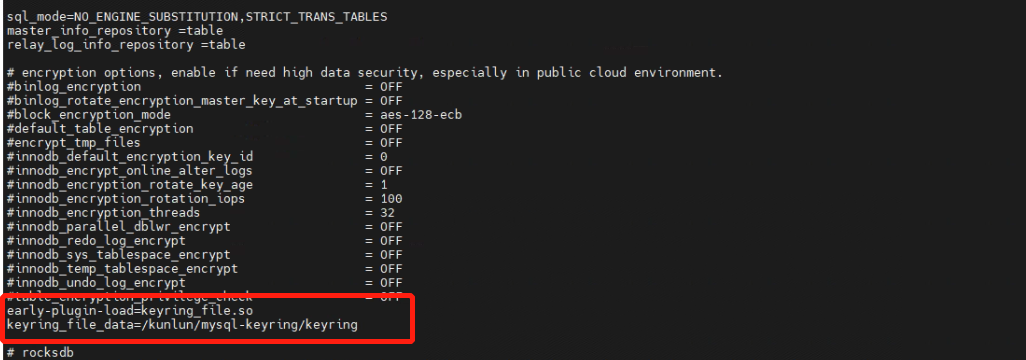
2.3 Modifications are required in the configuration files of all storage nodes. For instance, further modifications are also made here.
[kunlun@kunlun2 ~]$ vi /kunlun/storage_datadir/57005/data/57005.cnf

[kunlun@kunlun2 ~]$ vi /kunlun/storage_datadir/57007/data/57007.cnf
2.4 After making changes to the configuration files, restart the storage nodes.
[kunlun@kunlun2 ~]$ cd /kunlun/instance_binaries/storage/57003/Klustron-storage-1.2.1/dba_tools

[kunlun@kunlun2 ~]$ ./stopmysql.sh 57003

[kunlun@kunlun2 ~]$ ./startmysql.sh 57003

[kunlun@kunlun2 ~]$ cd /kunlun/instance_binaries/storage/57005/Klustron-storage-1.2.1/dba_tools

[kunlun@kunlun2 ~]$ ./stopmysql.sh 57005

[kunlun@kunlun2 ~]$ ./startmysql.sh 57005

[kunlun@kunlun2 ~]$ cd /kunlun/instance_binaries/storage/57007/Klustron-storage-1.2.1/dba_tools

[kunlun@kunlun2 ~]$ ./stopmysql.sh 57007

[kunlun@kunlun2 ~]$ ./startmysql.sh 57007
2.5 After restarting, verify that the encryption plugin has been successfully installed.
[kunlun@kunlun2 ~]$ mysql -h 192.168.56.113 -P57003 -upgx -ppgx_pwd

mysql> select * from information_Schema.plugins where plugin_name like '%keyring_file%'\G

mysql> show global variables like '%keyring%';
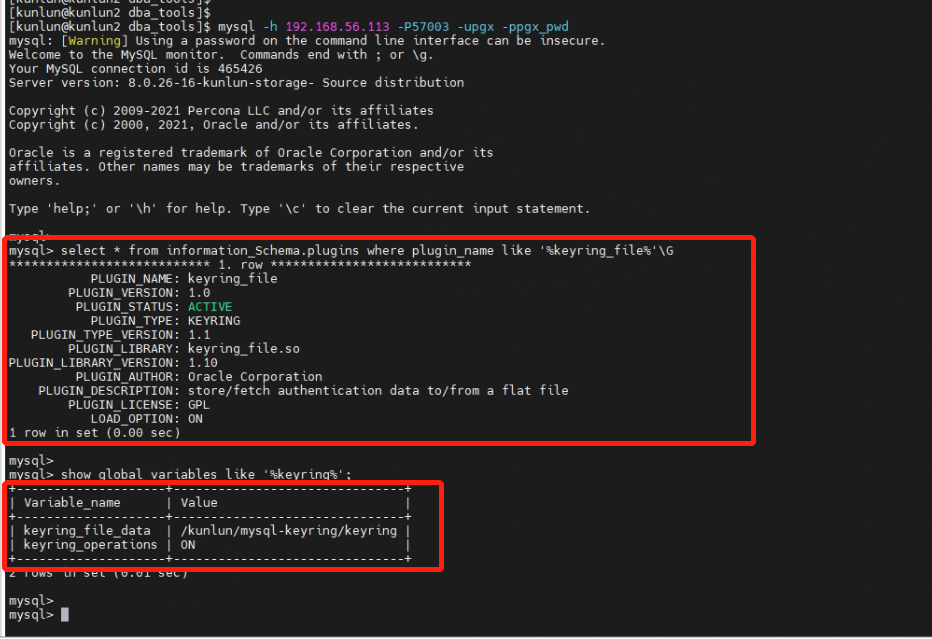
2.6 Check to see if the keyring file has been generated.
[kunlun@kunlun2 ~]$ ls -l /kunlun/mysql-keyring
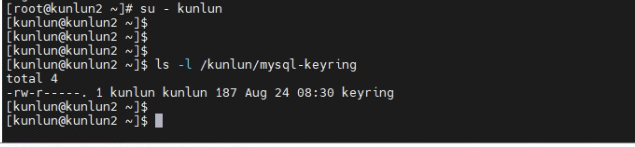
The encryption plugin installation is now complete.
03 Use Case for Table File Encryption
This is a test case based on table file encryption. We will create a business table called "product" which is not encrypted, and another business table named "product_encryp" which is encrypted. Afterward, we'll insert a significant amount of data into both the unencrypted "product" table and the encrypted "product_encryp" table. We will then examine the encryption properties of these two tables and compare the data of the two types of tables.
3.1 Connect to the database, create a database user, establish a test database, and grant user permissions.
[root@kunlun1 ~]# su - kunlun
[kunlun@kunlun1 ~]$ psql -h 192.168.56.112 -p 47001 postgres

create user kunlun_user with password 'kunlun';

create database testdb_encypt;

grant all privileges on database testdb_encypt to kunlun_user;

\c testdb_encypt kunlun_user
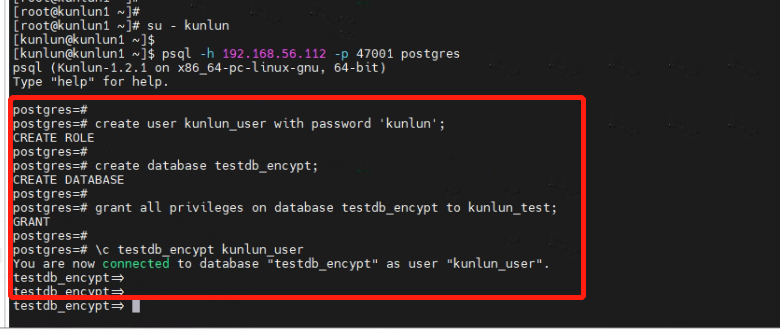
3.2 Create the non-encrypted "product" table and the encrypted "product_encryp" table. Insert data into both tables.
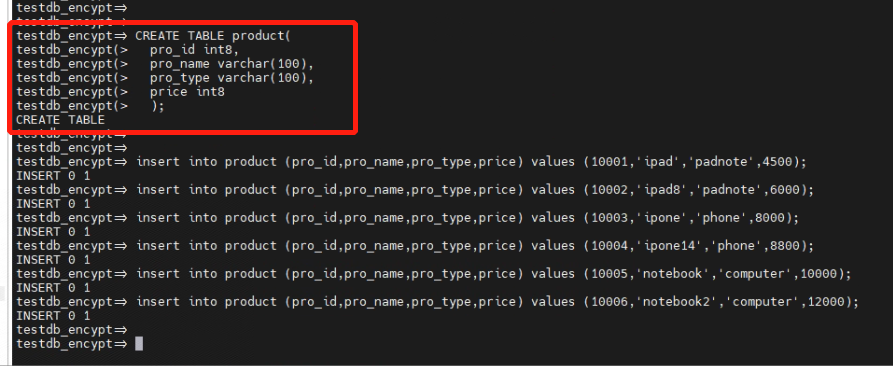
Create the non-encrypted "product" table and insert data:
CREATE TABLE product(
  pro_id int8,
  pro_name varchar(100),
  pro_type varchar(100),
  price int8
  );

insert into product (pro_id,pro_name,pro_type,price) values (10001,'ipad','padnote',4500);
insert into product (pro_id,pro_name,pro_type,price) values (10002,'ipad8','padnote',6000);
insert into product (pro_id,pro_name,pro_type,price) values (10003,'ipone','phone',8000);
insert into product (pro_id,pro_name,pro_type,price) values (10004,'ipone14','phone',8800);
insert into product (pro_id,pro_name,pro_type,price) values (10005,'notebook','computer',10000);
insert into product (pro_id,pro_name,pro_type,price) values (10006,'notebook2','computer',12000);
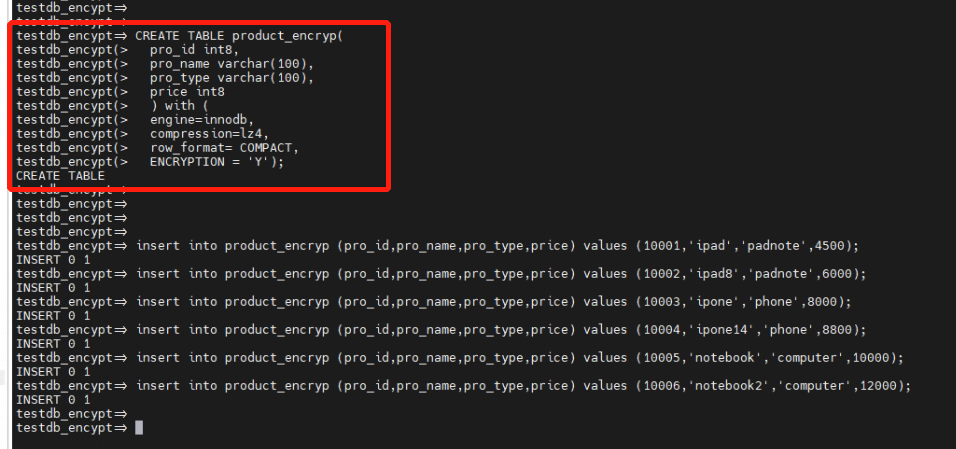
Create the encrypted "product_encryp" table and insert data:
CREATE TABLE product_encryp(
  pro_id int8,
  pro_name varchar(100),
  pro_type varchar(100),
  price int8
  ) with (
  engine=innodb,
  compression=lz4,
  row_format= COMPACT,
  ENCRYPTION = 'Y');

insert into product_encryp (pro_id,pro_name,pro_type,price) values (10001,'ipad','padnote',4500);
insert into product_encryp (pro_id,pro_name,pro_type,price) values (10002,'ipad8','padnote',6000);
insert into product_encryp (pro_id,pro_name,pro_type,price) values (10003,'ipone','phone',8000);
insert into product_encryp (pro_id,pro_name,pro_type,price) values (10004,'ipone14','phone',8800);
insert into product_encryp (pro_id,pro_name,pro_type,price) values (10005,'notebook','computer',10000);
insert into product_encryp (pro_id,pro_name,pro_type,price) values (10006,'notebook2','computer',12000);
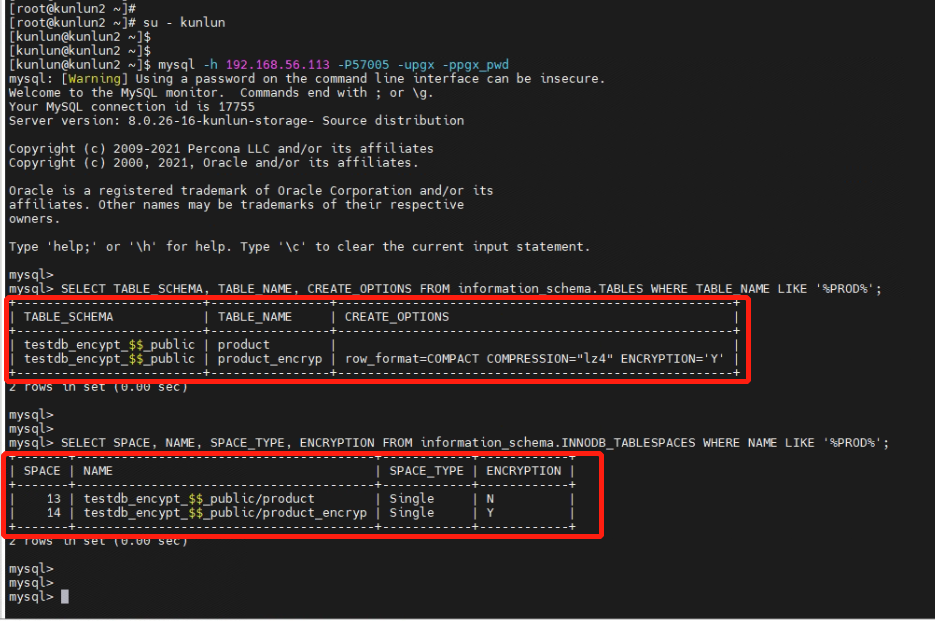
3.3 Review the database data dictionary, comparing the encryption properties of the non-encrypted "product" table and the encrypted "product_encryp" table. The properties should indicate that the "product_encryp" table is encrypted.
[root@kunlun2 ~]# su – Kunlun

[kunlun@kunlun2 ~]$ mysql -h 192.168.56.113 -P57005 -upgx -ppgx_pwd

SELECT TABLE_SCHEMA, TABLE_NAME, CREATE_OPTIONS FROM information_schema.TABLES WHERE TABLE_NAME LIKE '%PROD%';

SELECT SPACE, NAME, SPACE_TYPE, ENCRYPTION FROM information_schema.INNODB_TABLESPACES WHERE NAME LIKE '%PROD%';
3.4 Directly view data from the non-encrypted "product" table and the encrypted "product_encryp" table from the client side, and compare the data.
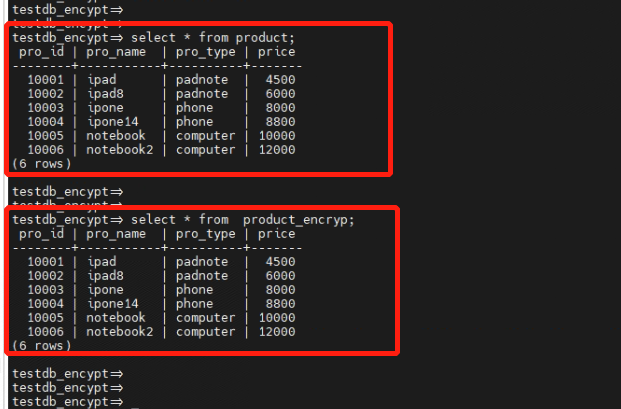
From the query results, it's evident that the encrypted table is transparent to front-end application queries. Direct usage of the table encryption feature doesn't necessitate any changes or modifications to the application.
04 Directly Viewing Encrypted Table Files from the Operating System
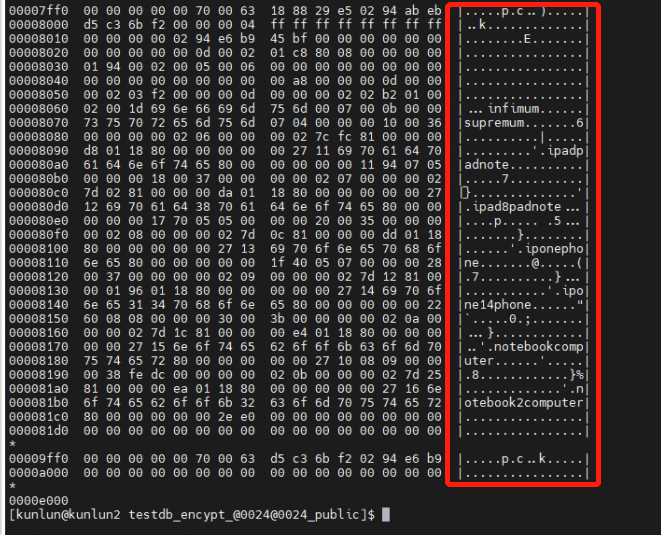
Encrypting the table files ensures data security. When table files are encrypted at the operating system level, viewing the files from this level will display ciphertext. Even if the file is stolen or copied elsewhere, its content remains as ciphertext, guaranteeing data security. Here, we will compare the content of non-encrypted table files with encrypted table files directly from the operating system level.
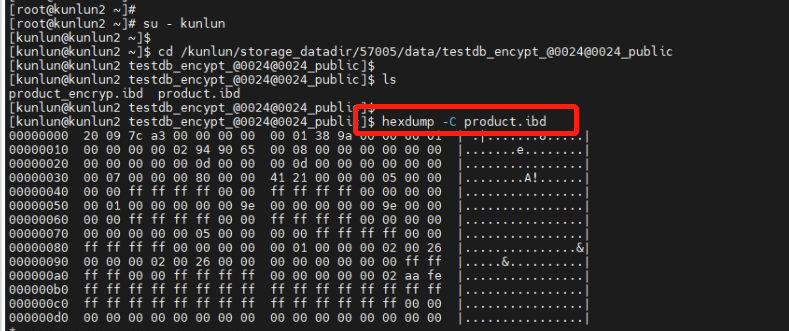
4.1 Directly view the system files of the non-encrypted "product" table from the operating system level. You can see the stored data in plaintext.
[root@kunlun2 ~]# su - kunlun

[kunlun@kunlun2 ~]$ cd /kunlun/storage_datadir/57005/data/testdb_encypt_@0024@0024_public

[kunlun@kunlun2 testdb_encypt_@0024@0024_public]$ ls
product_encryp.ibd  product.ibd

[kunlun@kunlun2 testdb_encypt_@0024@0024_public]$ hexdump -C product.ibd
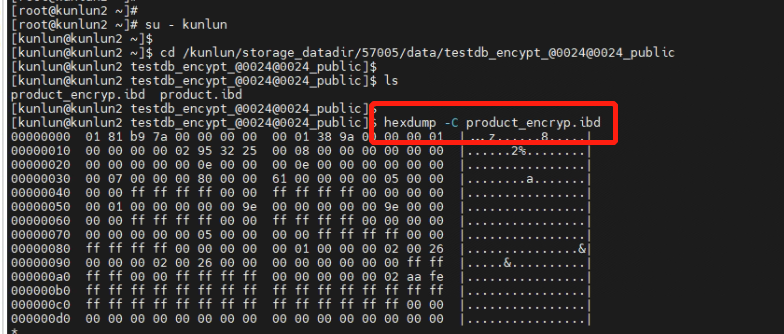
4.2 Directly view the system files of the encrypted "product_encryp" table from the operating system level. The stored data appears encrypted, making it impossible to retrieve the actual data.
[root@kunlun2 ~]# su - kunlun

[kunlun@kunlun2 ~]$ cd /kunlun/storage_datadir/57005/data/testdb_encypt_@0024@0024_public

[kunlun@kunlun2 testdb_encypt_@0024@0024_public]$ ls
product_encryp.ibd  product.ibd

[kunlun@kunlun2 testdb_encypt_@0024@0024_public]$ hexdump -C product_encryp.ibd
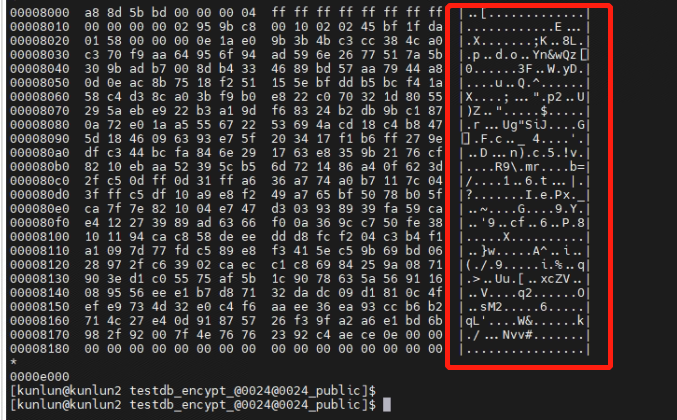
For the encrypted "product_encryp" table file, you can only see the ciphertext, making it impossible to view the data in plaintext.
This concludes the test case based on database table file encryption.