In the Klustron cluster, there are two types of system variables: those for compute nodes and those for storage nodes. This section provides a detailed description of these two categories of system variables.
The Klustron cluster maintains many system variables that affect operations. In compute nodes, most system variables can be configured at startup through the configuration file loaded by kunlun-server, or dynamically adjusted during runtime using the SET statement and the RELOAD method. Before making any modifications, it is essential to thoroughly understand the actual meaning, application configuration methods, and types of these system variables to avoid configuration failures or more severe impacts on the usage of Klustron.
In Klustron clusters, the compute nodes employ various methods for setting application system variables. These methods are presented in descending order of configuration complexity:
Internal: These settings cannot be directly changed as they reflect internally determined values. Some may be altered by rebuilding the server with different configuration options or by changing the options provided to initdb.
Postmaster: These options are only used at server startup, so any changes require a server restart. The values for these settings are typically stored in the postgresql.conf file or passed to the command line when the server starts. Settings of any lower context type can also be set at server startup. For Postmaster configuration type system variables, changes need to be made using the alter system set statement followed by a restart of the kunlun-server to take effect and will persist in the configuration file. Opening new sessions will apply the modified values. Note that using the set command to modify these settings will result in an error.
Sighup: These settings can be changed in postgresql.conf without restarting the server. Send a Sighup signal to the main process to make it re-read postgresql.conf and apply the changes. The main process also passes the Sighup signal to its child processes, so they all use the new values. For Sighup configuration type system variables, changes are made using the alter system set statement, followed by a reload, which will take immediate effect in the current session and will persist in the configuration file. New sessions or a restart of the kunlun-server will apply the modified values. Note that using the set command to modify these settings will result in an error.
Backend: These settings can be changed in postgresql.conf without restarting the server; they can also be set for a specific session in the connection request package (for example, via libpq's PGOPTIONS environment variable). However, these settings will never change after the session starts. If you change them in postgresql.conf, send a Sighup signal to the main process to make it re-read postgresql.conf. New values will only affect subsequently loaded sessions. For Backend configuration type system variables, changes need to be made using the alter system set statement followed by a reload, which will take effect for new sessions opened afterwards, but not for the current session. Changes will persist in the configuration file, and a restart of the kunlun-server will apply the modified values. Note that using the set command to modify these settings will result in an error.
SuperUser These values can be set in postgresql.conf or within a session using the SET command; however, only superusers can change them through SET. Changes in postgresql.conf will only affect existing sessions if no session-local values were established using SET. For SuperUser configuration type system variables, only superusers can execute changes using the set command, which takes immediate effect in the current session. Changes can also be made using the alter system set statement followed by a reload, taking immediate effect in the current session and persisting in the configuration file. New sessions or a restart of the kunlun-server will apply the modified values.
User: These values can be set in postgresql.conf or within a session using the SET command. Any user is allowed to change their session-local values. Changes in postgresql.conf will only affect existing sessions if no session-local values were established using SET. For User configuration type system variables, users can execute changes using the set command, which takes immediate effect in the current session. Changes can also be made using the alter system set statement followed by a reload, taking immediate effect in the current session and persisting in the configuration file. New sessions or a restart of the kunlun-server will apply the modified values.
Tips:
- System variables are persisted through the reload method, as detailed in the System Variables FAQ section.
- Among all system variables, some are specific to Klustron. This document only introduces those unique to Klustron compute nodes.
| Variable Name | autocommit |
|---|
| Description | Enables or disables auto-commit mode. |
| Variable Type | Boolean |
| Default Value | ON |
| Configuration Requirement | User |
| Version Introduced | v1.2 |
| Variable Name | check_primary_interval_secs |
|---|
| Description | Interval for checking all storage and metadata shard primary nodes. |
| Variable Type | Integer |
| Default Value | 3 |
| Valid Range | [1,100] |
| Configuration Requirement | User |
| Version Introduced | v1.2 |
| Variable Name | client_connection_type |
|---|
| Description | Specifies whether client connections are MySQL or PostgreSQL. |
| Variable Type | Enumeration |
| Default Value | FE_PG |
| Valid Options | FE_UNKNOWN,FE_PG,FE_MYSQL |
| Configuration Requirement | User |
| Version Introduced | v1.2 |
| Variable Name | cluster_commitlog_group_size |
|---|
| Description | Group size for writing xid to the commit log. |
| Variable Type | Integer |
| Default Value | 8 |
| Valid Range | [1,67108864] |
| Configuration Requirement | Postmaster |
| Version Introduced | v1.2 |
| Variable Name | comp_node_id |
|---|
| Description | Assigned to the compute node during its creation. |
| Variable Type | Integer |
| Default Value | |
| Valid Range | [0,2147483647] |
| Configuration Requirement | Postmaster |
| Version Introduced | v1.2 |
| Variable Name | debug_remote_connection |
|---|
| Description | Displays, in the form of a Notice, which shards are accessed during the execution of SQL for debugging purposes. |
| Variable Type | Boolean |
| Default Value | OFF |
| Configuration Requirement | User |
| Version Introduced | v1.2 |
| Variable Name | declared_mysql_server_version |
|---|
| Description | Declares the MySQL version that Klustron presents to MySQL client connectors. |
| Variable Type | String |
| Default Value | 8.0.29 |
| Configuration Requirement | Sighup |
| Version Introduced | v1.2 |
| Variable Name | default_nulls_smallest |
|---|
| Description | Treats nulls as the smallest value in ascending order by default. |
| Variable Type | Boolean |
| Default Value | ON |
| Configuration Requirement | User |
| Version Introduced | v1.2 |
| Variable Name | default_pgsql_collation |
|---|
| Description | Uses the default PostgreSQL collation for the MySQL session if no valid PostgreSQL collation is found in the pg_MySQL_collation_mapping for a given MySQL charset and collation. |
| Variable Type | String |
| Default Value | ucs_basic |
| Configuration Requirement | User |
| Version Introduced | v1.2 |
| Variable Name | enable_block_nestloop |
|---|
| Description | Enables block nest loop functionality to reduce interactions with storage nodes. |
| Variable Type | Boolean |
| Default Value | ON |
| Configuration Requirement | User |
| Version Introduced | v1.2 |
| Variable Name | enable_catalog_security_policy |
|---|
| Description | Adds row-level security checks for system catalog relations to prevent users from seeing names of objects they are not authorized to access (e.g., table names). |
| Variable Type | Boolean |
| Default Value | OFF |
| Configuration Requirement | Postmaster |
| Version Introduced | v1.2 |
| Variable Name | enable_collation_pushdown |
|---|
| Description | Pushes down collation to storage nodes. |
| Variable Type | Boolean |
| Default Value | ON |
| Configuration Requirement | User |
| Version Introduced | v1.2 |
| Variable Name | enable_coredump |
|---|
| Description | Generates a core dump file when any PostgreSQL process captures a fatal signal, which is very useful for diagnosing errors. |
| Variable Type | Boolean |
| Default Value | ON |
| Configuration Requirement | Sighup |
| Version Introduced | v1.2 |
| Variable Name | enable_debug_remote_path |
|---|
| Description | Used for optimizer debugging. Displays all alternative remote operators generated during the query optimization process. |
| Variable Type | Boolean |
| Default Value | OFF |
| Configuration Requirement | User |
| Version Introduced | v1.2 |
| Variable Name | enable_flatten_correlated_sublink |
|---|
| Description | Flattens any subquery correlated to semi-joins. |
| Variable Type | Boolean |
| Default Value | ON |
| Configuration Requirement | User |
| Version Introduced | v1.2 |
| Variable Name | enable_global_deadlock_detection |
|---|
| Description | Enables global deadlock detection and resolution. |
| Variable Type | Boolean |
| Default Value | ON |
| Configuration Requirement | Sighup |
| Version Introduced | v1.2 |
| Variable Name | enable_global_mvcc |
|---|
| Description | Enables global MVCC feature. |
| Variable Type | Boolean |
| Default Value | OFF |
| Configuration Requirement | Postmaster |
| Version Introduced | v1.2 |
| Variable Name | enable_olap_mode |
|---|
| Description | Sets parameters to optimize OLAP workloads. |
| Variable Type | Boolean |
| Default Value | OFF |
| Configuration Requirement | User |
| Version Introduced | v1.2 |
| Variable Name | enable_parallel_remotescan |
|---|
| Description | Considers remote scan plans as parallel-safe to enhance parallelism. |
| Variable Type | Boolean |
| Default Value | ON |
| Configuration Requirement | User |
| Version Introduced | v1.2 |
| Variable Name | enable_pg_mysql_charset_mapping_deduction |
|---|
| Description | Determines whether to use mappings deduced from documentation and public information. |
| Variable Type | Boolean |
| Default Value | ON |
| Configuration Requirement | User |
| Version Introduced | v1.2 |
| Variable Name | enable_remote_agg_pushdown |
|---|
| Description | Attempts to push down aggregation to storage shards for better performance. |
| Variable Type | Boolean |
| Default Value | ON |
| Configuration Requirement | User |
| Version Introduced | v1.2 |
| Variable Name | enable_remote_cursor |
|---|
| Description | Uses cursors to fetch tuples from remote shards, assuming enable_shard_binary_protocol is set. |
| Variable Type | Boolean |
| Default Value | OFF |
| Configuration Requirement | User |
| Version Introduced | v1.2 |
| Variable Name | enable_remote_distinct_pushdown |
|---|
| Description | Attempts to push down the DISTINCT clause to storage shards for improved performance. |
| Variable Type | Boolean |
| Default Value | ON |
| Configuration Requirement | User |
| Version Introduced | v1.2 |
| Variable Name | enable_remote_indexscan |
|---|
| Description | Attempts to create remote index scan plans. |
| Variable Type | Boolean |
| Default Value | ON |
| Configuration Requirement | User |
| Version Introduced | v1.2 |
| Variable Name | enable_remote_join_pushdown |
|---|
| Description | Attempts to push down table joins when both left and right tables are located in the same storage shard. |
| Variable Type | Boolean |
| Default Value | ON |
| Configuration Requirement | User |
| Version Introduced | v1.2 |
| Variable Name | enable_remote_limit_pushdown |
|---|
| Description | Attempts to push down the LIMIT clause to storage shards for better performance. |
| Variable Type | Boolean |
| Default Value | ON |
| Configuration Requirement | User |
| Version Introduced | v1.2 |
| Variable Name | enable_remote_orderby_pushdown |
|---|
| Description | Attempts to push down the ORDER BY to storage shards for improved performance. |
| Variable Type | Boolean |
| Default Value | ON |
| Configuration Requirement | User |
| Version Introduced | v1.2 |
| Variable Name | enable_replica_read |
|---|
| Description | Enables reading from replicas to reduce the read load on the primary. |
| Variable Type | Boolean |
| Default Value | OFF |
| Configuration Requirement | User |
| Version Introduced | v1.2 |
| Variable Name | enable_shard_binary_protocol |
|---|
| Description | When the client uses the binary protocol to communicate with the compute node, the compute node also uses the MySQL binary protocol to communicate with shards. |
| Variable Type | Boolean |
| Default Value | ON |
| Configuration Requirement | SuperUser |
| Version Introduced | v1.2 |
| Variable Name | enable_sql_log |
|---|
| Description | Logs SQL sent to storage shards to a separate SQL log for easier issue troubleshooting. |
| Variable Type | Boolean |
| Default Value | OFF |
| Configuration Requirement | User |
| Version Introduced | v1.2 |
| Variable Name | enable_stacktrace |
|---|
| Description | Prints stack traces to the server log files when any PostgreSQL process captures a fatal signal, useful for diagnosing errors. |
| Variable Type | Boolean |
| Default Value | ON |
| Configuration Requirement | Sighup |
| Version Introduced | v1.2 |
| Variable Name | enable_stmt_subxact |
|---|
| Description | Wraps user queries in internal sub-transactions, rolling back the sub-transaction in case of an error, instead of rolling back the entire transaction. |
| Variable Type | Boolean |
| Default Value | OFF |
| Configuration Requirement | User |
| Version Introduced | v1.2 |
| Variable Name | force_remote_sql_parameterize |
|---|
| Description | Parameterizes all constants in the pushed-down SQL, using the binary protocol for communication with storage nodes. |
| Variable Type | Boolean |
| Default Value | OFF |
| Configuration Requirement | SuperUser |
| Version Introduced | v1.2 |
| Variable Name | force_secure_file_access_proc |
|---|
| Description | Forces the use of Unix sockets when invoking file access functions. |
| Variable Type | Boolean |
| Default Value | ON |
| Configuration Requirement | Sighup |
| Version Introduced | v1.2 |
| Variable Name | global_deadlock_detector_victim_policy |
|---|
| Description | Determines how the global deadlock detector selects a victim to terminate in order to resolve global deadlocks. |
| Variable Type | Enumeration |
| Default Value | KILL_MOST_ROWS_LOCKED |
| Valid Options | KILL_OLDEST,KILL_YOUNGEST,KILL_MOST_ROWS_CHANGED,KILL_LEAST_ROWS_CHANGED,KILL_MOST_ROWS_LOCKED,KILL_MOST_WAITING_BRANCHES,KILL_MOST_BLOCKING_BRANCHES |
| Configuration Requirement | Sighup |
| Version Introduced | v1.2 |
| Variable Name | global_txn_commit_log_wait_max_secs |
|---|
| Description | Timeout for writing transaction logs to the metadata server during two-phase commits. |
| Variable Type | Integer |
| Default Value | 10 |
| Valid Range | [1,100000] |
| Unit | Seconds |
| Configuration Requirement | User |
| Version Introduced | v1.2 |
| Variable Name | gtss_concurrency |
|---|
| Description | The number of coroutines used for writing to the commit log. |
| Variable Type | Integer |
| Default Value | 4 |
| Valid Range | [1,8] |
| Configuration Requirement | Postmaster |
| Version Introduced | v1.2 |
| Variable Name | internal_read_only_double_quotes_symbols |
|---|
| Description | Determines if the current session uses double quotes (") to reference database objects (such as tables, columns, functions) (true) or string literals (false). |
| Variable Type | Boolean |
| Default Value | ON |
| Configuration Requirement | User |
| Version Introduced | v1.2 |
| Variable Name | max_remote_insert_blocks |
|---|
| Description | The maximum length of insert statements when compute nodes insert data into storage nodes. |
| Variable Type | Integer |
| Default Value | 1024 |
| Valid Range | [8,1048576] |
| Configuration Requirement | User |
| Version Introduced | v1.2 |
| Variable Name | metadata_connect_timeout |
|---|
| Description | Timeout for connecting to the metadata server. |
| Variable Type | Integer |
| Default Value | 20 |
| Valid Range | [1,100000] |
| Unit | Seconds |
| Configuration Requirement | User |
| Version Introduced | v1.2 |
| Variable Name | metadata_read_timeout |
|---|
| Description | Timeout for reading from the metadata server. |
| Variable Type | Integer |
| Default Value | 20 |
| Valid Range | [1,100000] |
| Unit | Seconds |
| Configuration Requirement | User |
| Version Introduced | v1.2 |
| Variable Name | metadata_write_timeout |
|---|
| Description | Timeout for writing to the metadata server. |
| Variable Type | Integer |
| Default Value | 20 |
| Valid Range | [1,100000] |
| Unit | Seconds |
| Configuration Requirement | User |
| Version Introduced | v1.2 |
| Variable Name | min_remote_index_paralleism |
|---|
| Description | Minimum parallelism for remote index scan operators. |
| Variable Type | Integer |
| Default Value | 0 |
| Valid Range | [0,1024] |
| Configuration Requirement | User |
| Version Introduced | v1.2 |
| Variable Name | mysql_ansi_quotes |
|---|
| Description | Uses double quotes (") to reference symbol names rather than string constants. |
| Variable Type | Boolean |
| Default Value | OFF |
| Configuration Requirement | User |
| Version Introduced | v1.2 |
| Variable Name | mysql_default_schema |
|---|
| Description | The default schema for MySQL connections established at connection time. If empty, the same operation as with PostgreSQL connections is performed and set to "$User, public". |
| Variable Type | String |
| Default Value | |
| Configuration Requirement | User |
| Version Introduced | v1.2 |
| Variable Name | mysql_interactive_timeout |
|---|
| Description | Timeout for waiting for the next command from the mysql CLI program before disconnecting. |
| Variable Type | Integer |
| Default Value | 1800 |
| Valid Range | [1,2000000000] |
| Unit | Seconds |
| Configuration Requirement | User |
| Version Introduced | v1.2 |
| Variable Name | mysql_net_buffer_length |
|---|
| Description | Size of the read/write buffer for each client connection using the MySQL server protocol. |
| Variable Type | Integer |
| Default Value | 65536 |
| Valid Range | [16384,1048576] |
| Unit | Bytes |
| Configuration Requirement | Backend |
| Version Introduced | v1.2 |
| Variable Name | mysql_net_retry_count |
|---|
| Description | Number of retries for connecting/writing/reading with peers. |
| Variable Type | Integer |
| Default Value | 10 |
| Valid Range | [1,1000000] |
| Configuration Requirement | User |
| Version Introduced | v1.2 |
| Variable Name | mysql_port |
|---|
| Description | Sets the TCP port on which the server listens for MySQL client connections using the MySQL protocol. |
| Variable Type | Integer |
| Default Value | User-specified |
| Valid Range | [1,65535] |
| Configuration Requirement | Postmaster |
| Version Introduced | v1.2 |
| Variable Name | mysql_protocol_compression_algos |
|---|
| Description | Compression algorithms used by MySQL, can only be a combination of 'zlib', 'zstd', and 'uncompressed'. |
| Variable Type | String |
| Default Value | zlib, zstd, uncompressed |
| Configuration Requirement | User |
| Version Introduced | v1.2 |
| Variable Name | mysql_protocol_ps_exec_fetch_rows |
|---|
| Description | How many rows to fetch in an EXECUTE or FETCH command through the MySQL binary protocol; if 0, all rows are fetched in EXECUTE. |
| Variable Type | Integer |
| Default Value | 0 |
| Valid Range | [0,2147483647] |
| Configuration Requirement | User |
| Version Introduced | v1.2 |
| Variable Name | mysql_send_resultset_metadata |
|---|
| Description | Whether to send result set metadata for connections using the MySQL protocol. |
| Variable Type | Boolean |
| Default Value | ON |
| Configuration Requirement | SuperUser |
| Version Introduced | v1.2 |
| Variable Name | mysql_wait_timeout |
|---|
| Description | Timeout for waiting for the next command from a mysql client before disconnecting. |
| Variable Type | Integer |
| Default Value | 1800 |
| Valid Range | [1,2000000000] |
| Unit | Seconds |
| Configuration Requirement | User |
| Version Introduced | v1.2 |
| Variable Name | net_motion_cost |
|---|
| Description | The cost for the compute node to read a 4KB data block from a storage node, used for optimizer cost estimation. |
| Variable Type | Real |
| Default Value | 1 |
| Valid Range | [0,1.79769e+308] |
| Configuration Requirement | User |
| Version Introduced | v1.2 |
| Variable Name | net_motion_penalty |
|---|
| Description | The penalty value for each interaction between compute nodes and storage nodes, used for optimizer cost estimation. |
| Variable Type | Real |
| Default Value | 100 |
| Valid Range | [0,1.79769e+308] |
| Configuration Requirement | User |
| Version Introduced | v1.2 |
| Variable Name | only_full_group_by |
|---|
| Description | Rejects queries where the SELECT list, HAVING condition, or ORDER BY list references non-aggregated columns that are neither named in the GROUP BY clause nor are functionally dependent on them. |
| Variable Type | Boolean |
| Default Value | ON |
| Configuration Requirement | User |
| Version Introduced | v1.2 |
| Variable Name | plan_cache_mode |
|---|
| Description | Controls the planner's choice between custom or generic plans. |
| Variable Type | Enumeration |
| Default Value | auto |
| Valid Options | auto,force_generic_plan,force_custom_plan |
| Configuration Requirement | User |
| Version Introduced | v1.2 |
| Variable Name | remote_cursor_prefetch_rows |
|---|
| Description | The number of rows fetched in batches by the compute node using a cursor from the storage node. |
| Variable Type | Integer |
| Default Value | 1000 |
| Valid Range | [1,2147483647] |
| Configuration Requirement | User |
| Version Introduced | v1.2 |
| Variable Name | remote_print_warning |
|---|
| Description | Enables warnings if certain operators/functions cannot be pushed down to storage nodes. |
| Variable Type | Boolean |
| Default Value | OFF |
| Configuration Requirement | User |
| Version Introduced | v1.2 |
| Variable Name | replica_read_fallback |
|---|
| Description | Specifies the fallback strategy when read-write separation is enabled and no replicas are available for reading: 0: Error; 1: Any replica; 2: Primary node. |
| Variable Type | Integer |
| Default Value | 2 |
| Valid Range | [0,3] |
| Configuration Requirement | User |
| Version Introduced | v1.2 |
| Variable Name | replica_read_latency_threshold |
|---|
| Description | The binlog synchronization delay threshold for replicas to be considered available for read operations under read-write separation. |
| Variable Type | Real |
| Default Value | 0 |
| Valid Range | [0,1e+10] |
| Configuration Requirement | User |
| Version Introduced | v1.2 |
| Variable Name | replica_read_order |
|---|
| Description | Defines how to sort replicas by priority for selection (higher priority means higher likelihood of selection) when read-write separation is enabled: 0: ro_weight; 1: ping latency; 2: binlog sync delay. |
| Variable Type | Integer |
| Default Value | 0 |
| Valid Range | [0,3] |
| Configuration Requirement | User |
| Version Introduced | v1.2 |
| Variable Name | replica_read_ping_threshold |
|---|
| Description | The ping latency threshold from the current compute node to a replica that can be used for replica reading when read-write separation is enabled. |
| Variable Type | Real |
| Default Value | 0 |
| Valid Range | [0,1e+10] |
| Configuration Requirement | User |
| Version Introduced | v1.2 |
| Variable Name | sharding_policy |
|---|
| Description | The strategy for placing tables on shards: 0: Random; 1: Least Storage; 2: Fewest Tables; 3: First Shard. |
| Variable Type | Integer |
| Default Value | 0 |
| Valid Range | [0,5] |
| Configuration Requirement | User |
| Version Introduced | v1.2 |
| Variable Name | single_shard_mode |
|---|
| Description | A cluster deployment mode when the cluster has only one shard. In this mode, compute nodes modify only local metadata during DDL operations, allowing users to freely define the mapping between compute node schemas and storage node schemas. |
| Variable Type | Boolean |
| Default Value | OFF |
| Configuration Requirement | Postmaster |
| Version Introduced | v1.2 |
| Variable Name | sql_auto_is_null |
|---|
| Description | For MySQL compatibility, always false. |
| Variable Type | Boolean |
| Default Value | OFF |
| Configuration Requirement | User |
| Version Introduced | v1.2 |
| Variable Name | start_global_deadlock_detection_wait_timeout |
|---|
| Description | If an insert, delete, or update statement sent to a storage shard has not returned after this duration, initiate a round of deadlock detection. |
| Variable Type | Integer |
| Default Value | 500 |
| Valid Range | [1,2147483647] |
| Configuration Requirement | User |
| Version Introduced | v1.2 |
| Variable Name | synchronize_meta_data_interval_secs |
|---|
| Description | Sets the interval for synchronizing metadata from the meta cluster. |
| Variable Type | Integer |
| Default Value | 60 |
| Valid Range | [1,1000] |
| Unit | Seconds |
| Configuration Requirement | User |
| Version Introduced | v1.2 |
| Variable Name | table_migration_recovery_max_retries |
|---|
| Description | The maximum number of retries when a storage node reports a NO_SUCH_TABLE error due to table migration. |
| Variable Type | Integer |
| Default Value | 8 |
| Valid Range | [0,16] |
| Configuration Requirement | User |
| Version Introduced | v1.2 |
| Variable Name | transform_create_db_to_schema |
|---|
| Description | In MySQL connections, transforms all CREATE DATABASE statements into CREATE SCHEMA statements. |
| Variable Type | Boolean |
| Default Value | ON |
| Configuration Requirement | User |
| Version Introduced | v1.2 |
In the Klustron cluster, many system variables impact operations. On storage nodes, most system variables can be configured at startup through the configuration file loaded by kunlun-storage, and they can also be dynamically adjusted during runtime using the set and set global commands. Before making any modifications, it is crucial to fully understand the actual meanings, scopes of application, and variable types of these system variables to avoid configuration failures or more severe impacts on the usage of Klustron. Adjustments to system variables on storage nodes should be made with caution, and it is advisable to consult the Klustron team before making changes.
In Klustron's storage nodes, the scope of setting system variables is divided into two levels, Session and Global, consistent with the setting methods in MySQL:
- Session level: Modifying session-level variables through the set command takes immediate effect within the current session until changed to another value or the session is reopened. This change does not affect other sessions.
- Global level: Modifying system variables at the global level through the set global command will persist the changes in the storage nodes. These changes affect only system variables that have a global scope and take immediate effect; if the variable has both global and session scopes, the modified value will not affect the current connection session, which will continue to use the session variable value from that session. It will only affect sessions that are opened after the changes are made.
The following system variables are unique to Klustron storage nodes and do not include MySQL's system variables.
| Variable Name | gmvcc_register_txns_at_readview_creation |
|---|
| Description | Registers transactions whose TGVC entries are cached into each read view upon creation, trading off increased memory usage for better performance. |
| Variable Type | Boolean |
| Default Value | FALSE |
| Scope | Global |
| Dynamic Modification | No |
| Version Introduced | v1.2 |
| Variable Name | enable_fullsync |
|---|
| Description | Whether to globally enable the fullsync mechanism or enable it in the current session. |
| Variable Type | Boolean |
| Default Value | TRUE |
| Scope | Global,Session |
| Dynamic Modification | Yes |
| Version Introduced | v1.2 |
| Variable Name | fullsync_timeout |
|---|
| Description | If the replica acknowledgment has not arrived within this many milliseconds since the transaction began, return an error to the client and write an error in the error log. |
| Variable Type | Integer |
| Default Value | 30000 |
| Valid Range | [5,4294967295] |
| Unit | Milliseconds |
| Scope | Global |
| Dynamic Modification | Yes |
| Version Introduced | v1.2 |
| Variable Name | fullsync_warning_timeout |
|---|
| Description | Write a warning in the error log if a replica acknowledgment has taken this many milliseconds to arrive since the transaction began. |
| Variable Type | Integer |
| Default Value | 3000 |
| Valid Range | [3,4294967295] |
| Unit | Milliseconds |
| Scope | Global |
| Dynamic Modification | Yes |
| Version Introduced | v1.2 |
| Variable Name | skip_fullsync_replica_acks_older_than |
|---|
| Description | Skip fsyncing relay logs or sending acknowledgments if replicas are this many milliseconds behind the primary nodes. |
| Variable Type | Integer |
| Default Value | 3600000 |
| Valid Range | [0,4294967295] |
| Unit | Milliseconds |
| Scope | Global |
| Dynamic Modification | Yes |
| Version Introduced | v1.2 |
| Variable Name | fullsync_fsync_ack_wait_max_milli_secs |
|---|
| Description | The maximum milliseconds a replica node waits for more event groups to arrive before fsync'ing relay logs and sending ACK. |
| Variable Type | Integer |
| Default Value | 2 |
| Valid Range | [0,4294967295] |
| Unit | Milliseconds |
| Scope | Global |
| Dynamic Modification | Yes |
| Version Introduced | v1.2 |
| Variable Name | fullsync_fsync_ack_least_txns |
|---|
| Description | Accumulate at least this many event groups before fsyncing relay logs and sending ACK. |
| Variable Type | Integer |
| Default Value | 10 |
| Valid Range | [0,4294967295] |
| Scope | Global |
| Dynamic Modification | Yes |
| Version Introduced | v1.2 |
| Variable Name | fullsync_fsync_ack_least_event_bytes |
|---|
| Description | Accumulate at least this many bytes of relay logs before fsyncing and sending ACK. |
| Variable Type | Integer |
| Default Value | 4096 |
| Valid Range | [0,4294967295] |
| Unit | Bytes |
| Scope | Global |
| Dynamic Modification | Yes |
| Version Introduced | v1.2 |
| Variable Name | fullsync_relaylog_fsync_ack_level |
|---|
| Description | This variable's value is assigned to replica channels upon creation to determine when to enable full synchronization, and whether the replica channel should fsync relay logs and/or reply with an ACK to its primary channel after writing its received event groups to its relay log file. Options are: 0: Do not fsync or send ACK; 1: Do not fsync but send ACK; 2: Fsync and send ACK. To change channel-specific settings later, execute CHANGE MASTER TO FULLSYNC_RELAY_LOG_FSYNC_ACK_LEVEL={0|1|2} [FOR CHANNEL 'xxx']。 |
| Variable Type | Integer |
| Default Value | 2 |
| Valid Range | [0,2] |
| Scope | Global |
| Dynamic Modification | Yes |
| Version Introduced | v1.2 |
| Variable Name | fullsync_consistency_level |
|---|
| Description | Determines whether and how to wait for full sync replica ACKs before replying to the client that the transaction has committed, at the end of the transaction commit. Options: 0: Do not wait; Positive: Wait for this number of ACKs. |
| Variable Type | Integer |
| Default Value | 1 |
| Valid Range | [0,1024] |
| Scope | Global |
| Dynamic Modification | Yes |
| Version Introduced | v1.2 |
| Variable Name | bg_worker_threads |
|---|
| Description | Number of background worker threads. |
| Variable Type | Integer |
| Default Value | 16 |
| Valid Range | [4,256] |
| Scope | Global |
| Dynamic Modification | Yes |
| Version Introduced | v1.2 |
| Variable Name | slow_logging_start_point |
|---|
| Description | Start point for logging slow queries: 2: Query reception; 1: Query start; or 0: After locking, to the end time. |
| Variable Type | Integer |
| Default Value | 2 |
| Valid Range | [0,2] |
| Scope | Global |
| Dynamic Modification | Yes |
| Version Introduced | v1.2 |
| Variable Name | print_extra_info_verbosity |
|---|
| Description | Level of detail for printing extra information to assist in problem diagnosis, including disconnect information, newly added log event fields, etc. The higher the number, the more detailed/printed information; 0 will disable printing any detailed information. |
| Variable Type | Integer |
| Default Value | 1 |
| Valid Range | [0,100000] |
| Scope | Global |
| Dynamic Modification | Yes |
| Version Introduced | v1.2 |
A: In Klustron, adjusting system variables sometimes requires restarting the kunlun-server, while others can be persisted into the compute nodes by reloading the configuration.
For example, to modify the system variable statement_timeout, first log into the kunlun-server and check its default value:
show statement_timeout;
Example:

Check the type of system variable value modification:
select * from pg_settings where name='statement_timeout';
Example:

Modify the configuration value:
alter system set statement_timeout = 200000;
Example:

Check the kunlun-server process, identify the directory where the pg_ctl tool is located. Here, using the port number 23007 as an example:
ps -ef|grep 23007
Example:

Locate the directory of pg_ctl:
cd /data/ha/kunlun/instance_binaries/computer/23007/Klustron-server-1.2.1/bin
ls -l
Example:
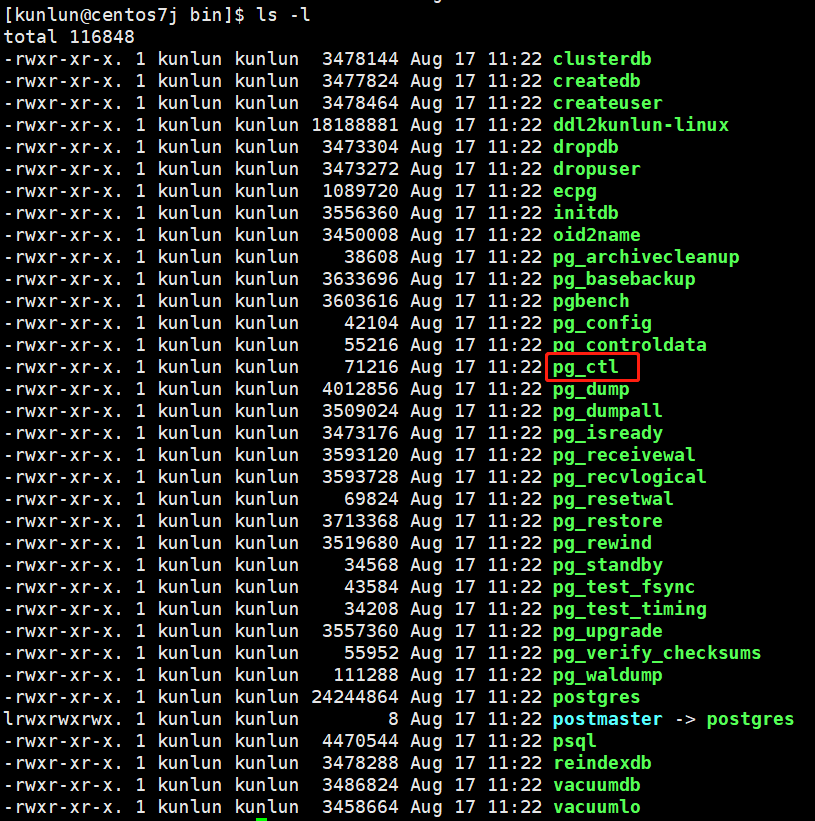
Execute reload:
./pg_ctl -D /data/ha/kunlun/server_datadir/23007 reload
Example:

Verify if the adjustment was successful by logging into the kunlun-server and checking the system variable default value:
show statement_timeout ;
Example:

Note: There may be multiple kunlun-servers, so the same steps need to be followed on other kunlun-servers to ensure all system variable configuration values are consistent across all compute nodes. Adjust accordingly for specific user requirements.
Here, using the system variable cluster_commitlog_delay_ms as an example, first log into the kunlun-server to check its default value:
show cluster_commitlog_delay_ms;
Example:

Check the type of system variable value modification:
select * from pg_settings where name='cluster_commitlog_delay_ms';
Example:

Modify the configuration value:
alter system set cluster_commitlog_delay_ms=11;
Example:

Check the kunlun-server process, confirm the directory of pg_ctl. Here, using the port number 23001 as an example:
ps -ef|grep 23001
Example:

Locate the directory of pg_ctl:
cd /data/ha/kunlun/instance_binaries/computer/23001/Klustron-server-1.2.1/scripts
ls -l
Example:

Execute the restart of kunlun-server:
Stop:
python2 stop_pg.py --port=23001
Example:

Start:
python2 start_pg.py --port=23001
Verify successful startup:
ps -ef|grep 23001
Example:

Verify if the adjustment was successful by logging into the kunlun-server and checking the system variable default value:
show cluster_commitlog_delay_ms ;
Example:

Note: There may be multiple kunlun-servers, so the same steps need to be followed on other kunlun-servers to ensure all system variable configuration values are consistent across all compute nodes. Adjust accordingly for specific user requirements.
