
KlustronDB Feature Series Sharing: Online DDL and Repartitioning
KlustronDB Feature Series Sharing: Online DDL and Repartitioning
Key Quotes from This Article
KlustronDB's Online DDL and Repartitioning features can make all DDL operations online, enabling convenient changes to table structures without affecting the operation of business systems.
Keywords: Online DDL, Repartitioning
1 Why?
Why this feature is needed
Changes in business requirements and the amount of data in the table may render the originally created table structure unsuitable, with possible scenarios including:
- Query and insert operations slow down due to unreasonable partitioning
- The table data is smaller, so it doesn't need as many partitions as before.
- Need to add or delete columns, and modify the data type of columns
- Modify primary key, add index
With these issues, we will inevitably need to make changes to the table structure so that it can readjust to the new business requirements.
However, since in most cases, the tables we need to change are being accessed by the business system and are likely hot tables, this also brings us a challenge: how to perform table changes without affecting business operations?
So how should we respond to such a challenge? The KlustronDB team developed online DDL and online table partition modification features, collectively referred to as table repartitioning (repartition).
This feature not only supports single table to partitioned table, partitioned table to single table, modifying table partitioning rules, and changing table partition parameters, but also supports making all DDL operations online (no table locks required, no impact on business system operations).
2 HOW?
How does KlustronDB perform table change operations without affecting business operations?
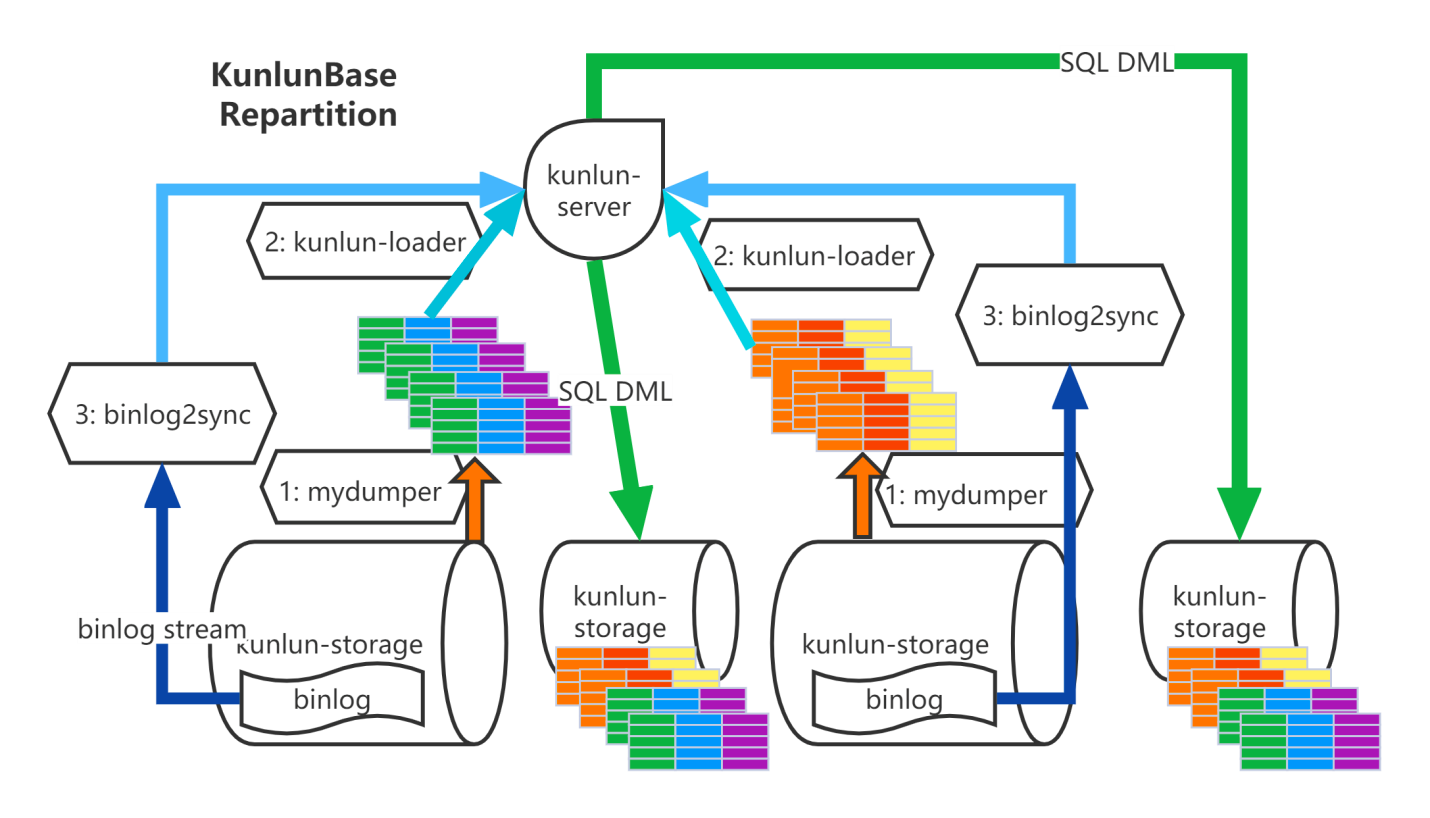
As shown in the picture above, the method we use is: export the data from the source table and write it into the target table, and then import any updates to the source table during this period into the target table. Detailed steps:
Export full table data: node_mgr calls mydumper to dump the source table data and transfers the data files to the server where the Kluscomp instances are located.
Load full table data: node_mgr calls the kunlun_loader tool to dump the full data from the source table into the target table.
binlog catch-up: node_mgr calls the binlog2sync tool according to the binlog starting positions recorded on each shard during the dump, and the binlog2sync tool starts dumping binlog events from that position.
Rename the source table and the target table: Use the binlog2sync tool to quickly synchronize the remaining binlogs, and then rename the target table to the source table name, so the business can resume normal operation.
Therefore, we can see that the overall implementation idea of KlustronDB's online DDL is similar in principle to Percona's gh-ost tool. Both achieve schema changes without locking the table by copying the source table data and then following the binlog.
3 More Detail (Detailed Explanation)
Operation Method:
KlustronDB's online ddl has two modes of operation:
Operation Method 1: Through the visual KlustronDB cluster management tool XPanel
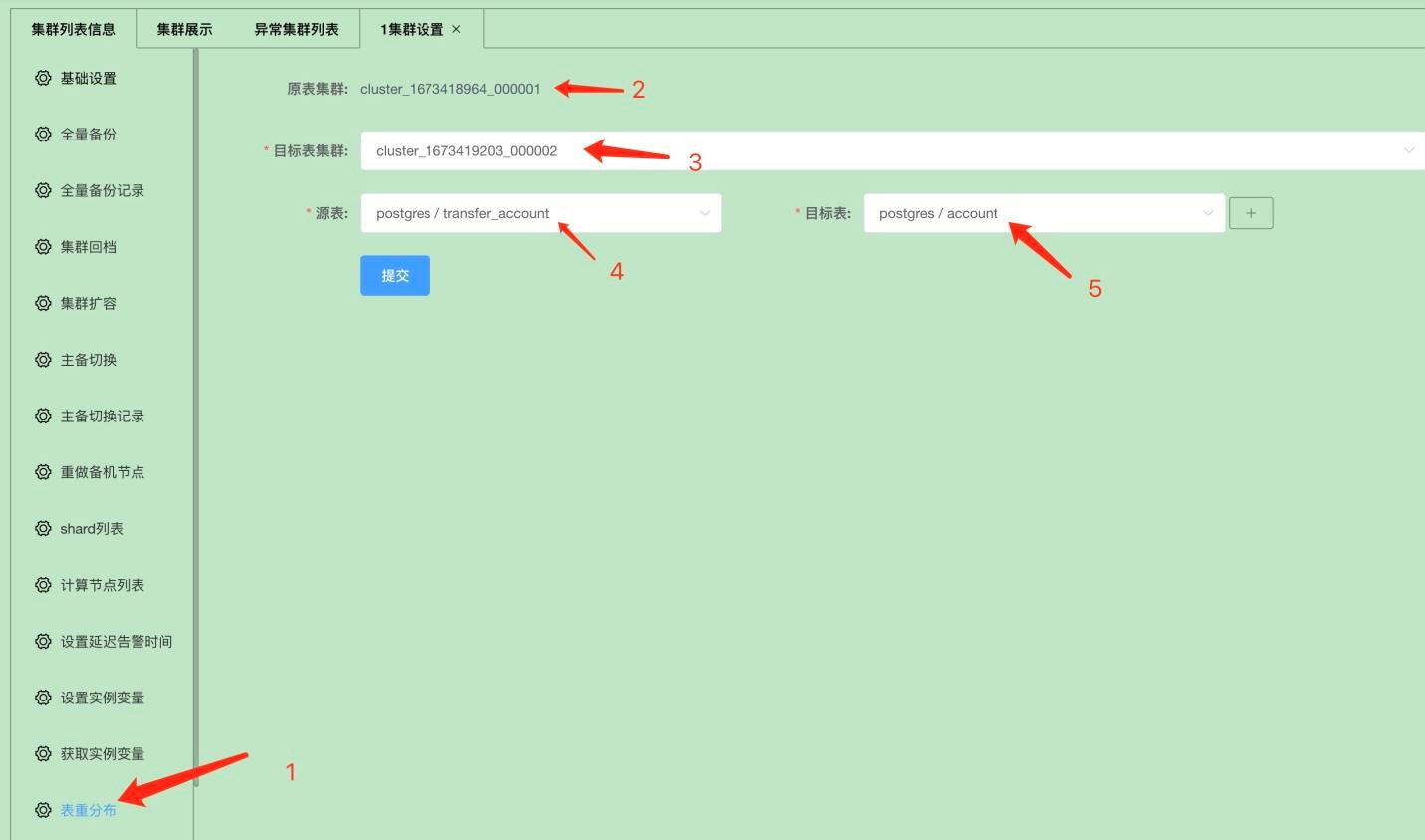

As shown in the figure above: you just need to fill in the relevant information such as the cluster, source table, and target table on the XPanel table redistribution interface, and then submit it to achieve online DDL or table redistribution.
Operation Method 2: Through the API of the cluster manager cluster_mgr
curl -d '
{
 "version":"1.0",
 "job_id":"",
"job_type":"table_repartition",
 "timestamp":"1435749309",
"user_name":"kunlun_test",
 "paras":{
 "src_cluster_id":"1",
 "dst_cluster_id":"3",
"repartition_tables":"postgres_$$_public.transfer_accout=>postgres_$$_public.account"
 }
}
' -X POST
http://127.0.0.1:58000/HttpService/Emit
We illustrate the situation of table structure changes through an example:
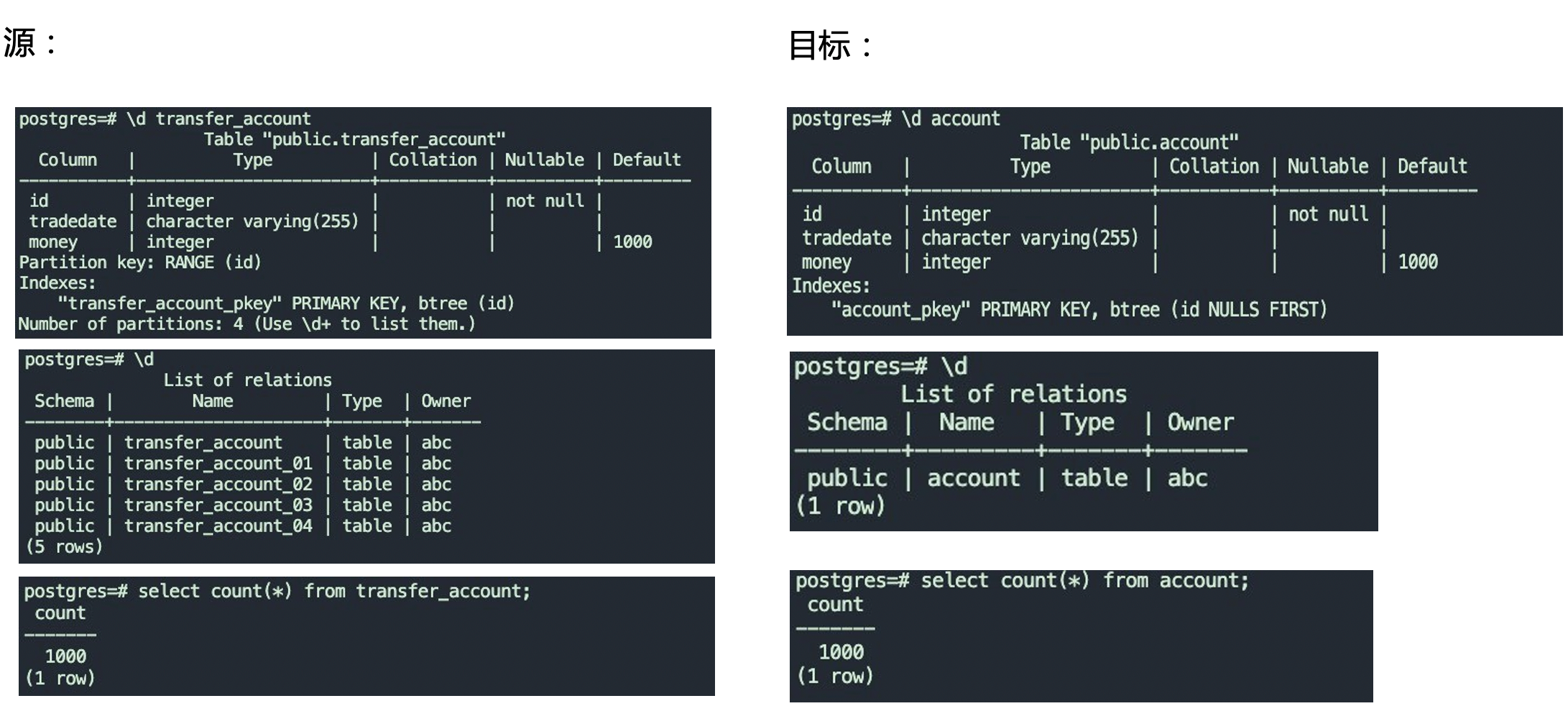
As shown in the above figure, we changed a partitioned table transfer_account to a regular table account through an online DDL.
There are the following points that need to be explained regarding the online deadline:
Column order: All column names from the source table must appear in the new table, but their order can be different. The new table can have additional columns, but these columns must have default values or allow NULL values. An online DDL can perform multiple operations at the same time, such as: adding columns (which can be added at any position in the table), adjusting column order, and modifying column constraints and default values.
Column data types: The data types of columns with the same name in the source table and the new table must be exactly the same or belong to the same general category, and the data type of the target table can be wider, but not narrower. For example, if both are integers, and the source table column is int, then the corresponding column in the target table can be bigint, but cannot be smallint or tinyint;
Index: The source table and the new table can have completely different index definitions and primary key definitions. However, the data in the source table must be able to satisfy all the unique indexes and primary key constraints of the new table; otherwise, the data import will fail. For example, the new table may be designed to modify the primary key, or to add an index or a unique index.
Partitioning: The source table and the new table can have completely different table partitioning rules and table partitioning parameters. Both the source table and the new table can be one of a single table, a mirror table, or a partitioned table. For example, the source table is a single, non-partitioned table, and the new table is partitioned according to a certain rule;
Table constraints: The source table and the new table can have different table-level check constraints and trigger definitions, but the data in the source table must be able to pass the check constraints of the new table, otherwise the data import will fail.
4 Q&A Discussion
Live Q1: MySQL also has the online DDL feature. What are the similarities and differences between your implementation and theirs, and what advantages do you have?
Answer: The main differences are:
1: MySQL's native online DDL handles concurrent DML by recording all modifications to the table and then replaying them on the new table, whereas KlustronDB achieves this through the binlog.
2: MySQL's online DDL requires storage engine support, whereas KlustronDB's does not.
3: MySQL's online DDL cannot handle all DDLs; some DDLs, such as dropping a primary key, while KlustronDB can handle all DDLs.
Therefore, KlustronDB's online DDL can be applied more widely than MySQL's native online DDL and supports more DDL operations.
Live Q2: Is the target table an intermediate table? Will it eventually be renamed to the name of the source table? Before renaming the table at the end, will the old source table be dropped?
Answer: Yes, by default it synchronizes and then renames to the source table. Users can also set it to not rename. Additionally, the old source table will not be deleted immediately; it is first renamed with a suffix tb_repartition${job_id}. By default, it is automatically deleted after 7 days. Users can also click to clean via xpanel, or specify to automatically delete after keeping it for a few days.
END