
Project and Filter Pushdown
Project and Filter Pushdown
Preface
The previous article discussed KlustronDB's query optimization process (Query Optimization Process), and this article demonstrates the pushdown of Project and Filter.
1. Basic Information of the Test Form
1.1 Test Environment
This test demonstrates the pushdown of projection and filter operations.
The database cluster in the test environment has a total of four data nodes (DN), configured as two shards (shard1 and shard2). Each shard node consists of a primary node and a secondary node (the two nodes of shard1 have a data replication relationship, the two nodes of shard2 also have a data replication relationship, and shard1 and shard2 store different partitioned data of the data tables). As shown in the figure below: 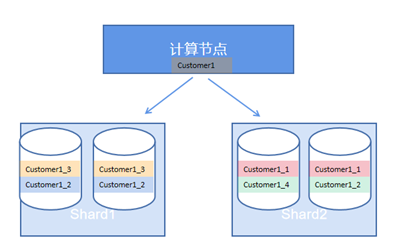
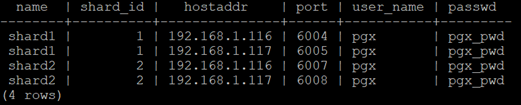
You can display the node information of the cluster environment using the following statement
select t1.name, t2.shard_id, t2.hostaddr, t2.port,
t2.user_name, t2.passwd from pg_shard t1, pg_shard_node t2
where t2.shard_id=t1.id;
The results are as shown in the figure below:
1.2 Table Structure
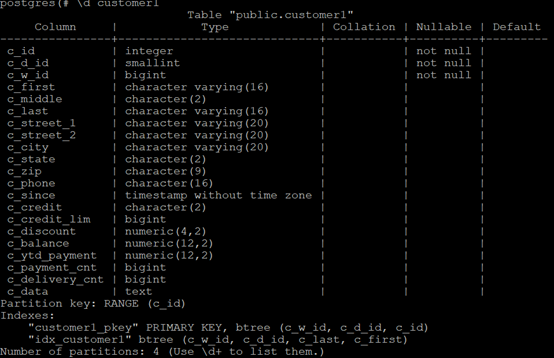
The table structure for this test is shown in the figure below:
1.3 Shard Information
Table Customer1 is partitioned by range based on the c_id field, and the corresponding partition tables are: Customer1_1,Customer1_2,Customer1_3,Customer1_4。
The 4 pieces of shard data are stored in two shards:
select t1.nspname, t2.relname,t2.relshardid, t2.relkind
from pg_namespace t1 join pg_class t2 ont1.oid = t2.relnamespace
where t2.relshardid != 0 and relkind='r' and relname like
'%customer1%' order by t2.relname;
The results are as shown in the figure below:

1.4 Data Distribution
Data falls into different shard storage according to sharding rules
The data distribution of the four partitions is shown in the figure below: _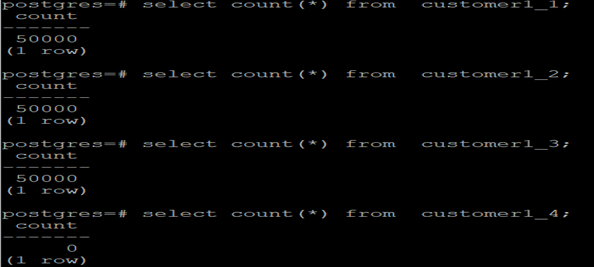
2. Query Process
2.1 Filtering
Filtering is the localization of the query scope. Through filtering, the number of data block reads and writes can be reduced.
Execution process: After the Kluscomp instance interprets the SQL statement, based on the shard information of the target table customer1, RemoteScan pushes the query statement down to the corresponding Klustore instances for execution (filtering out irrelevant shards), and the Klustore instances return the query results to the Kluscomp instance.
The Kluscomp instances use an asynchronous operation mode for query pushdown, allowing multiple Klustore instances to execute in parallel.
According to the sharding key value range, the following SQL statements are pushed down to the corresponding Klustore instance (shard2) (this is the first filtering by the SQL execution engine).
explain select c_id,c_first,c_middle from customer1
where c_id=4;
The results are as shown in the figure below:

The marked location is the filter operation in the execution plan.
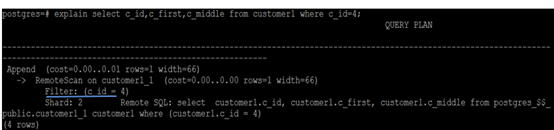
If the query condition does not include a sharding key, RemoteScan will send the statement to all shard nodes and filter the results based on the query condition.
explain select c_id ,c_middle,c_data from customer1
where c_middle='OE';
The results are as shown in the figure below:
_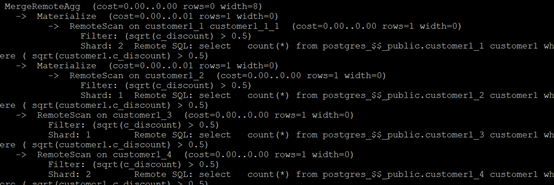
KlustronDB supports the use of functions and various complex conditions in query criteria
explain select count(*) from customer1
where sqrt(c_discount)>0.5;
The results are as shown in the figure below:
2.2 Project Projection
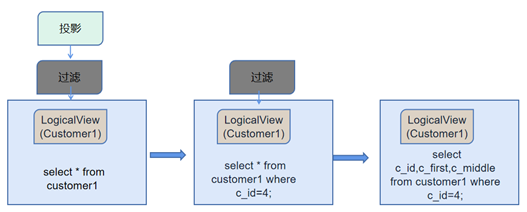
After the Kluscomp instance parses the SQL statement, based on the sharding information of the target table customer1, RemoteScan pushes down the query statement to each Klustore instance for execution, and the Klustore instances return certain fields (projection) of the query result rows to the Kluscomp instance.
The Project operation reduces the actual number of fields returned to the Kluscomp instance (only returning what the query needs, irrelevant fields will not be read into the memory of the Kluscomp instance).
The execution process is shown in the diagram below:
_
explain select c_id,c_first,c_middle from customer1;
The results are as shown in the figure:
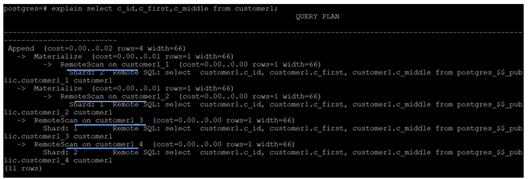
In the execution process of the above statement, remoteScan only returns the fields c_id, c_first, and c_middle data to the Kluscomp instance.
KlustronDB supports functions on fields and Projects with various complex conditions
explain selectc_balance + c_ytd_payment  from customer1
where c_id =20;
The results are as shown in the figure below:

The Klustore instance only returns the results of c_balance and c_ytd_payment to the Kluscomp instance.
2.3 Benefits of Sharding
A distributed database transparently distributes the database across different Klustore instances at the database layer, and the benefits brought by this are:
Transparent to applications, meaning that applications can access data without any modifications.
Klustore instances perform data reading and projection operations, reducing the load on Kluscomp instances (less CPU and memory consumption).
Data is distributed across different Klustore instances, facilitating the system's elastic scaling of IO capabilities and avoiding IO hotspot contention.
Projection and filtering operations, by reducing the range of data block reads and writes, can improve query efficiency.
3. Performance Comparison
In the same environment, create a data table with exactly the same data (volume) as customer1, then execute the same query and compare the efficiency of the queries.
3.1 Querying the Sharding Table
select now(); select count(*)  from customer1
where c_id between 4 and 10;select now();
The results are shown in the figure below: _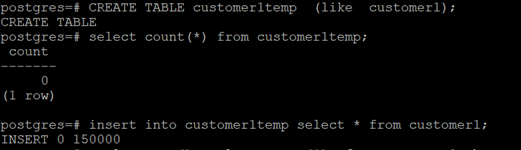
Time taken: 0.05s
3.2 Queries on Non-Sharded Tables
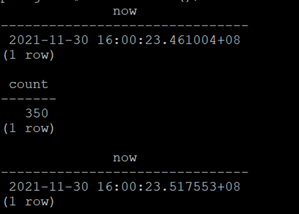
Create table:
CREATE TABLEcustomer1temp  (like  customer1);
insert intocustomer1temp select * From  customer1
The results are as shown in the figure below:
_
Query Time:
select now(); select count(*) from customer1temp
where c_idbetween 4 and 10 ;select now();
The results are as shown in the figure below: 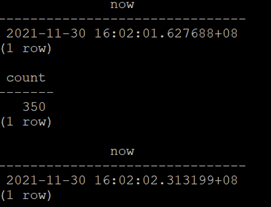
Time taken: 0.69s
Conclusion
By using Project and Filter, table partitioning can improve data query efficiency.